Tampilkan postingan dengan label Corel. Tampilkan semua postingan

Download CorelDraw 2020 Full version Cracked

08.04

Download CorelDraw 2020 Full version Cracked Terbaru aplikasi satu ini bisa kalian gunakan untuk membuat beragam design vector pada komputer pc atau laptop. Dengan menggunakan teknologi basis vektor berarti design yang kalian hasilkan tidak akan pecah ketika diperbesar. Menggantikan eksistensi CorelDraw 2019, versi terbarunya ini memiliki performa yang lebih powerful. Tidak tanggung-tanggung, Corel mengklaim 10x lebih cepat dari versi sebelumnya. ah masa si? gak percaya coba aja om...

Performa yang sangat powerful juga disertai dengan fitur yang semakin lengkap untuk membuat design logo, sketsa, vector illustration hingga layout. Tersedia banyak fitur canggih seperti Cutting-edge typography, collaboration tools, new AI-powered PowerTRACE, Art Style effects,Vector feathering, Inner Shadow tool, Smart Selection tool dan masih banyak lagi lainnya. Setelah di versi sebelumnya hanya hadir dalam sistem 32 bit dan 64 bit, sekarang pada CorelDraw 2020 juga hadir untuk Windows PC 7 hingga 10 sistem 32 bit dan 64 bit. Peningkatan yang dilakukan Corel sangat sayang untuk kalian lewatkan. Jadi langsung aja coba software design vector terbaru ini, download CorelDraw 2020 full version Cracked gratis terbaru pada link download di bawah melalui link ini.


Fitur CorelDraw 2020
  • 10x faster performance than 2019
  • Can share your concepts with your reviewers to view, annotate, and comment directly
  • New typographic Engine and step-up to core type tools
  • Cutting-edge typography
  • New numbered lists and increasement to bulleted lists
  • Fine-tune type responsively with support for variable fonts
  • Fabulous new AI-powered PowerTRACE
  • Superb AI-powered image solutions
  • Clear noise from highly-compressed JPEG images
  • Adjust new machine-learned effects to bitmaps and vectors
  • Build masks faster and more accurately with the new Smart Selection tool
  • Increasement to Find & Replace, Align and Distribute, shadow effects, and more
  • Art Style effects, Vector feathering, Inner Shadow tool, and Bitmap effects lens
  • Enhanced Brush performance and color replacement
  • Improved Dialog box UI

System Requirements CorelDraw 2020 :
  • Microsoft Windows 7, 8.1 , and 10 (64-bit or 32-bit)
  • Intel Core i3/5/7/9 or AMD Ryzen 3/5/7/9/Threadripper, EPYC
  • OpenCL 1.2 capable video card (recommended)
  • 4 GB RAM
  • 4 GB available space of your hard disk
  • 1280 x 720 screen resolution at 100% (96 dpi)
  • Microsoft.NET Framework 4.7.2

Link Download:
  • Download CorelDraw Graphics Suite 2020 Via [Google Drive]
  • Download CorelDraw Graphics Suite 2020 Via [Media Fire]

Cara Install:
  1. Matikan Internet dan antivirus terlebih dahulu
  2. Ekstrak file hasil download dengan Winrar atau 7Zip dengan password kopiarsip.com
  3. Install setup.exe
  4. Klik install jika menggunakan windows 64 bit.
  5. Klik No menggunakan windows 32 bit, lalu klik Yes.
  6. Biarkan di pilihan 'I have a serial number' klik Next.
  7. Pilih 'Typical Installation' atau pilih custom, Next.
  8. Biarkan standar, Next.
  9. Bisa pilih bahasa atau biarkan standar, klik Install Now.
  10. Instalasi sedang berlangsung..
  11. Jalankan program CorelDRAW 2020, klik Agree.
  12. Done


CorelDRAW Graphics Suite 2019 Full Version

19.05


CorelDRAW Graphics Suite 2019 v21.1.0.643 Full Version adalah sebuah software desain yang sangat terkenal dan sudah banyak digunakan oleh para desainer di dunia. Anda dapat dengan mudah membuat desain 2D menggunakan program CorelDRAW Graphics Suite 2019 Full ini. Apalagi berbagai macam fitur yang dibutuhkan untuk mengedit atau membuat desain juga sudah disediakan lengkap di dalamnya. Memang untuk dapat menggunakan software ini dengan baik dibutuhkan keterampilan khusus, karena seperti kita tahu banyak sekali fitur yang ada di dalam program CorelDRAW Graphics Suite 2019 Full ini, sehingga memang membutuhkan waktu yang cukup lama untuk mempelajari semua fitur aplikasi ini agar dapat digunakan secara maksimal.

Di dalam update CorelDRAW Graphics Suite 2019 Full terbaru ini sebenarnya tidak ada perbedaan yang terlalu mencolok dengan CorelDraw X7 Full Version yang sudah lebih dulu keluar dan sudah pernah admin bagikan sebelumnya. Pada versi terbaru ini anda para pengguna windows 10 sudah dapat menggunakan aplikasi coreldraw ini. Terlebih lagi CorelDRAW Graphics Suite 2019 Full ini juga sudah support dengan 4000 display yang lebih maksimal bagi anda para pengguna windows 10 tentunya.

Main Features :

Compatibility
Multi-monitor, 4K and Real-Time Stylus support
Corel Font Manager
Font filtering and search
Show Objects
Copy Curve Segments
Gaussian Blur feature
Healing Clone tool
Straighten Image dialog box
Knife Tool
Workspace customization
Startup assistance
Border and Grommet dialog box
Get More docker
Easy, professional website design
Learning materials and expert tips
Royalty-free, quality content
System Requirements:

Microsoft Windows 10, Windows 8.1 or Windows 7, in 32-bit or 64-bit, all with latest Updates and Service Pack
Intel Core i3/5/7 or AMD Athlon 64
2 GB RAM
1 GB hard disk space
Multi-touch screen, mouse or tablet
1280 x 720 screen resolution at 100% (96 dpi)
Microsoft Internet Explorer 11 or higher
Microsoft .Net Framework 4.6
How to Install :

Unpack and start installer offlinne.
Open keygen and choose GraphicsSuite 2019 on the list generated one serial, don’t close keygen.
Paste it back to setup screen. Proceed.
After installed, you will get some kind of account screen, close it.
Click “Activation Code” button of keygen now, wait for Data added message from keygen.
Install update setup.
Block the following lines to prevent pirated etc. messages after some days:
0.0.0.0 mc.corel.com
0.0.0.0 apps.corel.com
0.0.0.0 origin-mc.corel.com
0.0.0.0 iws.corel.com
0.0.0.0 compute-1.amazonaws.com
0.0.0.0 ipm.corel.com
0.0.0.0 dev1.ipm.corel.public.corel.net

Link Download

ZippyShare

32 Bit : Part 1 , Part 2

64 Bit : Part 1 , Part 2


78 Shortcut Keyboard CorelDRAW yang Perlu Kamu Pahami

07.39

Ada sekitar 78 tombol shortcut di corel draw yang perlu kamu ketahui. Meskipun tidak semuanya perlu dipahami, paling tidak kamu hafal beberapa shortcut yang penting-penting saja.

Tanpa menggunakan tombol shortcut pun sebenarnya kita bisa mengerjakan desain di corel draw. Tapi terkadang orang males, pingin yang cepet hehehe.

Berikut ini saya sampaikan 78 tombol (shortcut keys) di corel draw yang mungkin pingin kamu kepoin :D

Kumpulan tombol shorcut corel draw dan fungsinya

Tombol shortcut menu terdiri dari 59;
  1. Ctrl + N     = untuk membuat lembar kerja baru di corel draw
  2. Ctrl + O     = untuk membuka lembar kerja corel draw
  3. Ctrl + S     = untuk menyimpan lembar kerja corel draw
  4. Ctrl + Shift + S = untuk menyimpan ulang lembar kerja corel draw dengan nama berbeda
  5. Ctrl + + I    = untuk mengimpor atau memasukkan objek bitmap [foto/gambar]
  6. Ctrl + + E    = untuk menyimpan file corel draw menjadi gambar bitmap
  7. Ctrl + P     = untuk ngeprint file corel draw
  8. Ctrl + Z    = undo
  9. Ctrl + shift + Z = redo
  10. Ctrl + R    = repeat
  11. Ctrl + X    = meng-cut objek yang ada di lembar kerja corel draw
  12. Ctrl + C    = meng-Copy objek di lembar kerja corel draw
  13. Ctrl + V    = untuk mempaste hasil copy
  14. Ctrl + D    = menduplikat objek
  15. Ctrl + shift + D = step and repeat
  16. Alt + Enter    = memunculkan object properties
  17. F9        = untuk melihat preview kerja corel draw secara full screen
  18. Ctrl + F2    = view manager
  19. Alt + shift + D = memunculkan dynamic guides
  20. Alt + shift + A = memunculkan alignment guides
  21. Ctrl + G    = untuk meng-group semua objek di corel draw
  22. Ctrl + U    = untuk meng-ungroup semua objek di corel draw
  23. Ctrl + L    = combine
  24. Ctrl + K    = break apart
  25. Ctrl + Q    = mengubah teks jadi objek dan mengubah objek jadi objek vector
  26. Ctrl + shift + Q = mengubah garis menjadi objek utuh
  27. Alt + F7    = position
  28. Alt + F8    = rotate
  29. Alt + F9    = scale and mirror
  30. Alt + F10    = size
  31. L        = align left [sejajar bagian sisi kiri]
  32. R        = align right [sejajar bagian sisi kanan]
  33. T        = align top [sejajar atas]
  34. B        = align bottom [sejajar bawah]
  35. E        = align centers horizontally
  36. C        = align centers vertically
  37. P        = center to page
  38. Ctrl + F9    = contour
  39. Ctrl + F7    = envelope
  40. Alt + F3    = lens
  41. Ctrl + B    = brightness/contrast
  42. Ctrl + shift + B = color balance
  43. Ctrl + shift + U = hue and saturation
  44. Ctrl + T    = text properties
  45. Ctrl + shift + T = edit text
  46. Ctrl + F11    = memunculkan insert character
  47. Alt + F12    = align to baseline
  48. Ctrl + F8    = convert
  49. Ctrl + F12    = spell check
  50. Ctrl + J    = options
  51. Ctrl + F6    = color styles
  52. Ctrl + F5    = object styles
  53. Alt + shift + F11 = macro manager
  54. Alt + F11    = macro editor
  55. Alt + shift + F12 = VSTA editor
  56. Ctrl + shift + R = record temporary macro
  57. Ctrl + shift + P = run temporary macro
  58. Ctrl + shift + O = stop recording
  59. Ctrl + W    = refresh window


Tombol shortcut toolbox terdiri dari 19;
  1. F10    = shape tool
  2. X    = eraser
  3. Z    = zoom
  4. H    = pan
  5. F5    = freehand
  6. I    = artistic media
  7. Shift + s = smart drawing
  8. F6    = rectangle
  9. F7    = ellipse
  10. Y    = polygon
  11. D    = grap paper
  12. A    = spiral
  13. F8    = text tool
  14. F12    = mengatur ketebalan outline
  15. Shift + F12 = mengatur warna outline
  16. F11    = fountain fill
  17. Shift + F11 = uniform fill
  18. G    = interactive fill
  19. M    = mesh fill

Silahkan kalian hafalkan tombol shortcutnya (kalau mau hehehe). Apabila ada yang kurang jelas, silahkan bertanya dikolom komentar. Semoga apa yang sudah saya sampaikan bermanfaat.


CorelDRAW Graphics Suite X8 Full Crack

10.58

Sekian lama menunggu akhirnya CorelDRAW, salah satu software photo editor terbaik telah merilis versi terbaru mereka. Baru saja beberapa jam dirilis, CorelDRAW Graphics Suite X8 Full Crack sudah mendapat tanggapan yang baik di kalangan designers. Software yang satu ini berguna layaknya software Adobe Ilustrator, yakni sebagai Vector Designer. CorelDRAW Graphics Suite X8 Full Crack  memang lebih sering digunakan dalam dunia percetakan dibanding photoshop yang lebih handal dibidang manipulasi. Dalam versi terbaru kali ini, terdapat berbagai update yang tentunya akan membantu kamu membuat berbagai objek design mulai dari design konveksi, poster, vector, dan lainnya dengan mudah. Bahkan, CorelDRAW sering dipakai oleh para designer-designer di percetakan. 

How to install and activate Corel Draw X8 with the help of a crack, the steps are given as below
  1. First of all open Corel Draw office site to download Corel Draw 8X
  2. Now Download & Extract Corel Draw X8 a crack  from blue download button on the top.
  3. Click Coreldraw.exe
  4. Now install it
  5. You can also use a CD or a DVD to install it if you don’t have an active internet connection
  6. Just open your CD or DVD, click Corel Draw exe and then install
  7. This is all you needed to do

Corel Draw X8 2016 Keygen
  1. First of all download and install Corel Draw X8
  2. Now download a Corel Draw X8 Keygen
  3. Now click to open Keygen
  4. The keygen will generate serial keys and an activation code
  5. Copy the generated codes
  6. Now paste Corel Draw Registration Key to activation box
  7. Enjoy your activated Corel Draw X8
  8. This is all you had to do


Corel Draw X8 – Features
  • It is a fully professional software
  • Its web design software is very powerful
  • It supports high resolution 4K format
  • It has a fully customized interface
  • It possesses a multi display with high resolution
  • Loads quickly and runs very fast
  • It is compatible with both Windows 7 and Windows 10.
  • It is very easy to use with a neat interface


Crack


Corel WordPerfect Office X8 Professional 18.0.0.200 Full Version Rar (1.8 GB)

09.59

Corel WordPerfect Office X8 Professional 18.0.0.200 Full Version Rar (1.8 GB) - Professional Edition is the preferred office leader for delivering effective documents, presentations, spreadsheets and more. Get impressive results using the enhanced Reveal Codes feature, Template Previews, built-in PDF forms and the Paradox database management system. Take advantage of the user-suggested enhancements to streamline your most important workflow needs and enjoy support for over 60 file types, including the latest Microsoft Office formats. Choose the affordable and powerful solution to be successful in any office environment.

Features

  • Built-in PDF functionality: Create, edit and share PDF files right from your desktop – all at no additional cost. Choose the fillable PDF form option to interactively collect important information or open any PDF with WordPerfect X8 to reuse text or graphics. With the flexibility of PDF publishing you can share documents, charts and presentations.
  • Popular feature improvements: Thanks to invaluable feedback from our trusted users, we have made some of our most well-liked features even better! Now, you can create more powerful documents, persuasive presentations, dynamic spreadsheets and captivating slideshows with expanded Reveal Codes, helpful add-ons, new Template Preview, free extras and more.
  • Microsoft Office compatibility: With the ability to open, edit and save your documents in a variety of popular file formats, you’ll have peace of mind knowing your information will be well received. Enjoy compatibility for Microsoft Word, Excel and PowerPoint files in addition to over 60 file types for unrivalled support and sharing.
  • Improved workflow efficiencies: Work harder and faster with workflow improvements, time-saving tools and a brighter background to frame important page content. In one complete trusted office suite, you’ll discover interactive PDF tools, a Mail Merge Expert, Reveal Codes, Favorites, eBook Publisher and even Metadata Removal to complete all of your important tasks with ease.

Screenshots


System Requirements

  • Microsoft Windows 10, Microsoft Windows 8.1, Windows 7 (32-bit or 64-bit editions), with the latest service pack and update installed
  • 1.15 GB hard disk for minimum installation†
  • 1 GB RAM (32-bit) or 2 GB RAM (64-bit)
  • 1 GHz or faster (32-bit) or a 64-bit processor
  • 1024 x 768 monitor resolution
  • DVD drive (required for box installation)
  • Mouse or tablet with stylus
  • Microsoft Internet Explorer 11 or later

Corel VideoStudio Ultimate X10 Cracked Full Version | masnafi.com

08.55

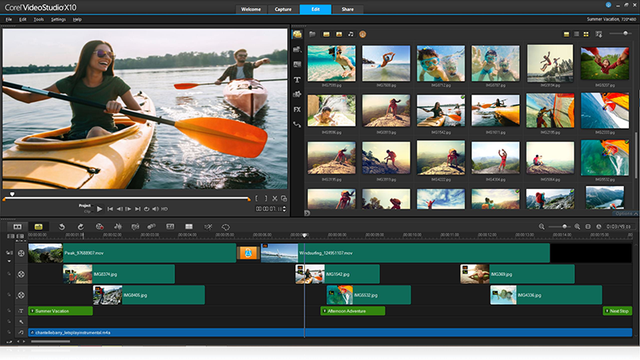
Corel VideoStudio Ultimate X10 final terbaru fulll adalah software Editing yang Dulunya bernama ULEAD, namun sekarang telah di Upgrade menjadi sebuah tool editing video yang profesional  dan nama pun di dubah menjadi Corel VideoStudio Ultimate.

Berkapasitas besar, dan membutuhkan ruang lingkup yang besar pula, namun itu sangat sesuai dengan tools tools canggih yang mampu menghasilkan video dengan kualitas jitu tentunya. buat kamu yang belum memilikinya dan ingin mencoba nya.. silahkan.

System Requirement
  • Intel Core Duo 1.83 GHz Processor or AMD Dual Core 2.0 GHz Processor (Intel Core i5 or i7 Processor, or AMD Phenom II X6 or X8 Processor recommended)
  • Microsoft Windows 8 or Windows 7 with latest service packs installed (32-bit or 64-bit editions)
  • 2 GB of RAM (4 GB of RAM or higher and 1 GB of VRAM or higher recommended)
  • 1024 x 768 screen resolution


Installation Instructions by masnafi :
  1. First, you should close Internet connection completely.
  2. Open [setup_SC2.exe] and install the software.
  3. Use XFORCE Keygen to generate your Serial
  4. After Installation and BEFORE starting application. Click on Generate Activation Code in XFORCE Keygen
  5. You should get a message ‘Activation data has been added successfully! :)’
  6. Block the program in firewall to avoid serial blacklisting.
  7. Start Application.
  8. Finally enjoy Corel VideoStudio Ultimate X10 Activation License Full Version.